Computer Processor Types
A few years ago, choosing a processor was pretty straightforward. AMD
and Intel each produced two series of processors, a mainstream line and
a budget line. Each company used only one processor socket, and there
was a limited range of processor speeds available. If you wanted an
Intel processor, you might have a dozen mainstream models and a
half-dozen budget models to choose among. The same was true of AMD.
OEM Versus Retail-Boxed
To further confuse matters, most AMD and Intel processors are
available in two types of packaging, called OEM and retail-boxed. OEM
processor packages include only the bare processor and usually provide
only a 90-day warranty. Retail-boxed processors include the processor, a
compatible CPU cooler, and a longer warranty, typically three years.
A retail-boxed processor is usually the better deal. It typically
costs only a few dollars more than the OEM version of the same
processor, and the bundled CPU cooler is usually worth more than the
price difference. But if you plan to install an after-market CPU cooler
for example, because you are upgrading your system to be as quiet as
possible it may make sense to buy the OEM processor.
Nowadays, choosing a processor isn't as simple. AMD and Intel now
make literally scores of different processor models. Each company now
offers several lines of processors, which differ in clock speed, L2
cache, socket type, host-bus speed, special features supported, and
other characteristics. Even the model names are confusing. AMD, for
example, has offered at least five different processor models under the
same name Athlon 64 3200+. An Intel Celeron model number that ends in J
fits Socket 775, and the same model number without the J designates the
same processor for Socket 478. A Pentium 4 processor model number that
ends in J says nothing about the socket type it is designed for, but
indicates that the processor supports the execute-disable bit feature.
And so on.
AMD and Intel each offer the three categories of processors described in the following sections.
Budget processors
Budget processors give up a bit of performance in exchange
for a lower price. At any given time, AMD or Intel's fastest available
budget processor is likely to have about 85% of the performance of their
slowest mainstream model. Budget processors are more than sufficient
for routine computing tasks. (After all, today's budget processor was
yesterday's mainstream processor and last week's performance processor.)
Budget processors are often the best choice for a system upgrade,
because their lower clock speeds and power consumption make it more
likely that they'll be compatible with an older motherboard.
AMD Sempron
The various models of the
AMD Sempron processor sell in the
$50 to $125 range, and are targeted at the budget through low-end
mainstream segment. The Sempron replaced the discontinued Socket A Duron
processor in 2004, and the obsolescent Socket A Athlon XP processor in
2005. Various Sempron models are available in the obsolescent Socket A
and in the same Socket 754 used by some Athlon 64 models.
AMD actually packages two different processors under the Sempron name. A Socket A Sempron, also called a
K7 Sempron, is in fact a re-badged Athlon XP processor. A Socket 754 Sempron, shown in
Figure 5-1 is also called a
K8 Sempron,
and is really a cut-down Athlon 64 model running at a lower clock speed
with a smaller L2 cache and a single-channel memory controller rather
than the dual-channel memory controller of the Athlon 64. Early Sempron
models had no support for 64-bit processing. Recent Sempron models
include 64-bit support, although the practicality of running 64bit
software on a Sempron is questionable. Still, like the Athlon 64, the
Sempron also runs 32-bit software very efficiently, so you can think of
the 64-bit support as future-proofing.
Figure 5-1: AMD Sempron processor (image courtesy of AMD, Inc.)
If you have a Socket 462 (A) or Socket 754 motherboard in your
system, the Sempron offers an excellent upgrade path. You'll need to
verify compatibility of your motherboard with the specific Sempron you
intend to install, and you may need to upgrade the BIOS to recognize the
Sempron.
For more information about Sempron processor models, visit
http://www.amd.com/sempron.
Intel Celeron
For many years, the
Intel Celeron processor was the poor
stepsister, offering too little performance at too high a price. Cynical
observers believed that the only reason Intel sold any Celeron
processors at all was that system makers wanted the Intel name on their
boxes without having to pay the higher price for an Intel mainstream
processor.
That all changed when Intel introduced their Celeron D models, which
are now available for Socket 478 and Socket 775 motherboards. While
Celeron D models are still slower than Semprons dollar-for-dollar, the
disparity is nowhere near as large as in years past. Celeron D
processors, which sell in the $60 to $125 range, are very credible
upgrade processors for anyone who owns a Socket 478 or Socket 775
motherboard. Like the Sempron, Celeron models are available with 64-bit
support, although again the practicality of running 64-bit software on
an entry-level processor is questionable. Once again, it's important to
verify the compatibility of your motherboard with the specific Celeron
you intend to install, and you may need to upgrade the BIOS to recognize
the Celeron.
AVOID NON-D CELERON PROCESSORS
Celeron processors (without the "D") are based on the Northwood core
and have only 128 KB of L2 cache. These processors have very poor
performance, and unfortunately remain available for sale. The Celeron D
models are based on the Prescott-core, and have 256 KB of L2 cache.
For more information about Celeron processor models, visit
http://www.intel.com/celeron.
Mainstream processors
Mainstream processors typically cost $125 to $250 although
the fastest models sell for $500 or more and offer anything up to about
twice the overall performance of the slowest budget processors. A
mainstream processor may be a good upgrade choice if you need more
performance than a budget processor offers and are willing to pay the
additional cost.
However, depending on your motherboard, a mainstream processor may
not be an option even if you are willing to pay the extra cost.
Mainstream processors consume considerably more power than most budget
processors, often too much to be used on older motherboards. Also,
mainstream processors often use more recent cores, larger L2 caches, and
other features that may or may not be compatible with an older
motherboard. An older power supply may not provide enough power for a
current mainstream processor, and the new processor may require faster
memory than is currently installed. If you intend to upgrade to a
mainstream processor, carefully verify compatibility of the processor,
motherboard, power supply, and memory before you buy the processor.
AMD Athlon 64
The
AMD Athlon 64 processor, shown in
Figure 5-2,
is available in Socket 754 and Socket 939 variants. As its name
indicates, the Athlon 64 supports 64-bit software, although only a tiny
percentage of Athlon 64 owners run 64-bit software. Fortunately, the
Athlon 64 is equally at home running the 32-bit operating systems and
applications software that most of us use.
Figure 5-2: AMD Athlon 64 processor (image courtesy of AMD, Inc.)
Like the Sempron, the Athlon 64 has a memory controller built onto
the processor die, rather than depending on a memory controller that's
part of the chipset. The upside of this design decision is that Athlon
64 memory performance is excellent. The downside is that supporting a
new type of memory, such as DDR2, requires a processor redesign. Socket
754 models have a single-channel PC3200 DDR-SDRAM memory controller
versus the dual-channel controller in Socket 939 models, so Socket 939
models running at the same clock speed and with the same size L2 cache
offer somewhat higher performance. For example, AMD designates a Socket
754 Newcastle-core Athlon 64 with 512 KB of L2 cache running at 2.2 GHz a
3200+ model, while the same processor in Socket 939 is designated an
Athlon 64 3400+.
NUMBERS LIE
The model numbers of Athlon 64 and Sempron processors are scaled
differently. For example, the Socket 754 Sempron 3100+ runs at 1800 MHz
and has 256 KB of cache, and the Socket 754 Athlon 64 2800+ runs at the
same clock speed and has twice as much cache. Despite the lower model
number, the Athlon 64 2800+ is somewhat faster than the Sempron 3100+.
Although AMD hotly denies it, most industry observers believe that AMD
intends Athlon 64 model numbers to be compared with Pentium 4 clock
speeds and Sempron model numbers with Celeron clock speeds. Of course,
Intel also designates their recent processors by model number rather
than clock speed, confusing matters even further.
For more information about Athlon 64 processor models, visit
http://www.amd.com/athlon64.
Intel Pentium 4
The Pentium 4, shown in
Figure 5-3, is Intel's
flagship processor, and is available in Socket 478 and Socket 775.
Unlike AMD which sometimes uses the same Athlon 64 model number to
designate four or more different processors with different clock speeds,
L2 cache sizes, and sockets Intel uses a numbering scheme that
identifies each model unambiguously.
Older Pentium 4 models, which are available only in Socket 478, are
identified by clock speed and sometimes a supplemental letter to
indicate FSB speed and/or core type. For example, a Socket 478
Northwood-core Pentium 4 processor operating at a core speed of 2.8 GHz
with the 400 MHz FSB is designated a Pentium 4/2.8. The same processor
with the 533 MHz FSB is designated a Pentium 4/2.8B, and with the 800
MHz FSB it's designated a Pentium 4/2.8C. A 2.8 GHz Prescott-core
Pentium 4 processor is designated a Pentium 4/2.8E.
Figure 5-3: Intel Pentium 4 600 series processor (image courtesy of Intel Corporation)
Socket 775 Pentium 4 models belong to one of two series. All
500-series processors use the Prescott-core and have 1 MB of L2 cache.
All 600-series processors use the Prescott 2M core and have 2 MB of L2
cache. Intel uses the second number of the model number to indicate
relative clock speed. For example, a Pentium 4/530 has a clock speed of 3
GHz, as does a Pentium 4/630. The 540/640 models run at 3.2 GHz, the
550/650 models at 3.4 GHz, the 560/660 models at 3.6 GHz, and so on. A
"J" following a 500-series model number (for example, 560J) indicates
that the processor supports the XDB feature, but not EM64T 64-bit
support. If a 500-series model number ends in 1 (for example, 571) that
model supports both the XDB feature and EM64T 64-bit processing. All
600-series processors support both XDB and EM64T.
For more information about Pentium 4 processor models, visit
http://www.intel.com/pentium4.
Extreme Processors
We classify the fastest, most expensive mainstream processors those
that sell in the $400 to $500 range as performance processors, but AMD
and Intel reserve that category for their top-of-the-line models, which
sell for $800 to $1,200. These processors the AMD Athlon 64 FX, the Intel Pentium 4 Extreme Edition, and the Intel Pentium Extreme Edition
are targeted at the gaming and enthusiast market, and offer at best
marginally faster performance than the fastest mainstream models.
In fact, the performance bump is generally so small that we think
anyone who buys one of these processors has more dollars than sense. If
you're considering buying one of these outrageously expensive
processors, do yourself a favor. Buy a $400 or $500 high-end mainstream
processor instead, and use part of the extra money for more memory, a
better video card, a better display, better speakers, or some other
component that will actually provide a noticeable benefit. Either that,
or keep the extra money in the bank.
Dual-core processors
By early 2005, AMD and Intel had both pushed their processor cores to
about the fastest possible speeds, and it had become clear that the
only practical way to increase processor performance significantly was
to use two processors. Although it's possible to build systems with two
physical processors, doing that introduces many complexities, not least a
doubling of the already-high power consumption and heat production.
AMD, later followed by Intel, chose to go dual-core.
Combining two cores in one processor isn't exactly the same thing as
doubling the speed of one processor. For one thing, there is overhead
involved in managing the two cores that doesn't exist for a single
processor. Also, in a single-tasking environment, a program thread runs
no faster on a dual-core processor than it would on a single-core
processor, so doubling the number of cores by no means doubles
application performance. But in a multitasking environment, where many
programs and their threads are competing for processor time, the
availability of a second processor core means that one thread can run on
one core while a second thread runs on the second core.
The upshot is that a dual-core processor typically provides 25% to
75% higher performance than a similar single-core processor if you
multitask heavily. Dual-core performance for a single application is
essentially unchanged unless the application is designed to support
threading, which many processor-intensive applications are. (For
example, a web browser uses threading to keep the user interface
responsive even when it's performing a network operation.) Even if you
were running only unthreaded applications, though, you'd see some
performance benefit from a dual-core processor. This is true because an
operating system, such as Windows XP, that supports dual-core processors
automatically allocates different processes to each core.
AMD Athlon 64 X2
The
AMD Athlon 64 X2, shown in
Figure 5-4,
has several things going for it, including high performance, relatively
low power requirements and heat production, and compatibility with most
existing Socket 939 motherboards. Alas, while Intel has priced its least
expensive dual-core processors in the sub-$250 range, the least
expensive AMD dual-core models initially sold in the $800 range, which
is out of the question for most upgraders. Fortunately, by late 2005 AMD
had begun to ship more reasonably priced dual-core models, although
availability is limited.
Figure 5-4: AMD Athlon 64 X2 processor (image courtesy of AMD, Inc.)
For more information about Athlon 64 X2 processor models, visit
http://www.amd.com/athlon64.
Intel Pentium D
The announcement of AMD's Athlon 64 X2 dual-core processor caught
Intel unprepared. Under the gun, Intel took a cruder approach to making a
dual-core processor. Rather than build an integrated dual-core
processor as AMD had with its Athlon 64 X2 processors, Intel essentially
slapped two slower Pentium 4 cores on one substrate and called it the
Pentium D dual-core processor.
The 800-series 90 nm Smithfield-core Pentium D, shown in
Figure 5-5,
is a stop-gap kludge for Intel, designed to counter the AMD Athlon 64
X2 until Intel can bring to market its real answer, the dual-core 65 nm
Presler-core processor, which is likely to be designated the 900-series
Pentium D. The Presler-based dual-core processors will be fully
integrated, compatible with existing dual-core Intel-compatible
motherboards, and feature reduced power consumption, lower heat output,
twice as much L2 cache, and considerably higher performance.
Figure 5-5: Intel Pentium D dual-core processor (image courtesy of Intel Corporation)
Reading the foregoing, you might think we had only contempt for the
800-series Pentium D processors. In fact, nothing could be further from
the truth. They're a kludge, yes, but they're a reasonably cheap, very
effective kludge, assuming that you have a motherboard that supports
them. We extensively tested an early sample of the least expensive
800-series Pentium D, the 820. The 820 runs at 2.8 GHz, and under light,
mostly single-tasking use, the 820 "feels" pretty much like a 2.8 GHz
Prescott-core Pentium 4. As we added more and more processes, the
difference became clear. Instead of bogging down, as the single-core
Prescott would have done, the Pentium D provided snappy response to the
foreground process.
For more information about Pentium D processor models, visit
http://www.intel.com/products/processor/....
AMD and Intel processor summaries
Table 5-2 lists the important characteristics of current AMD processors, including the special features they support.
Table 5-2: Table 5-2. AMD processor summary
Table 5-3 lists the important characteristics of current Intel processors, including the special features they support.
Table 5-3: Intel processor summary
SPECIAL FEATURES
Special features are not always implemented across an entire line of
processors. For example, we list the Pentium D 8XX-series processors as
supporting EM64T, SSE3, EIST, and dual core. At the time we wrote this,
three Pentium D 8XX models were available: the 2.8 GHz 820, the 3.0 GHz
830, and the 3.2 GHz 840. The 830 and 840 models support all of the
special features listed. The 820 model supports EM64T, SSE3, and
dual-core operation, but not EIST. If a special feature listed as being
supported by a particular line of processors is important to you, verify
that it is supported in the exact processor model you intend to buy.

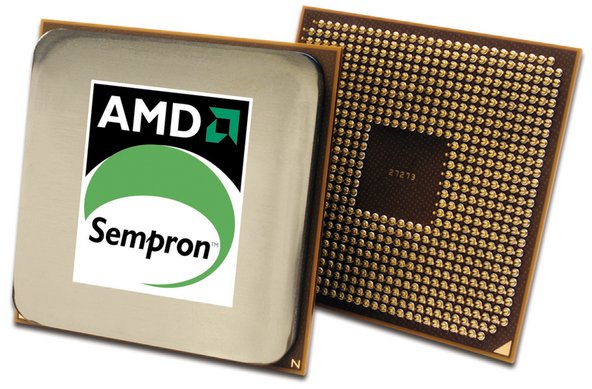 Figure 5-1: AMD Sempron processor (image courtesy of AMD, Inc.)
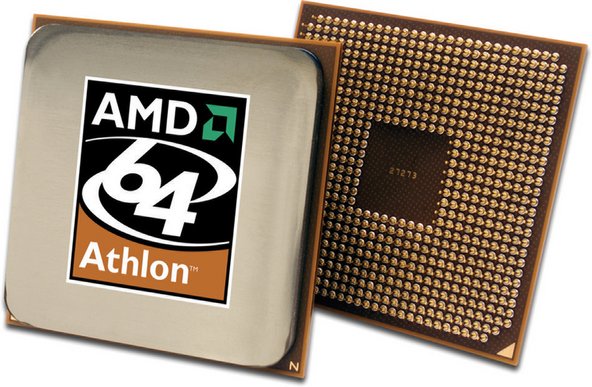 Figure 5-2: AMD Athlon 64 processor (image courtesy of AMD, Inc.)
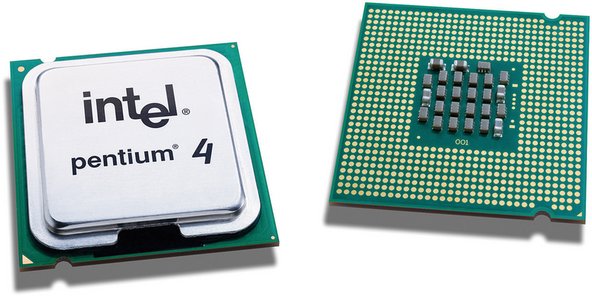 Figure 5-3: Intel Pentium 4 600 series processor (image courtesy of Intel Corporation)
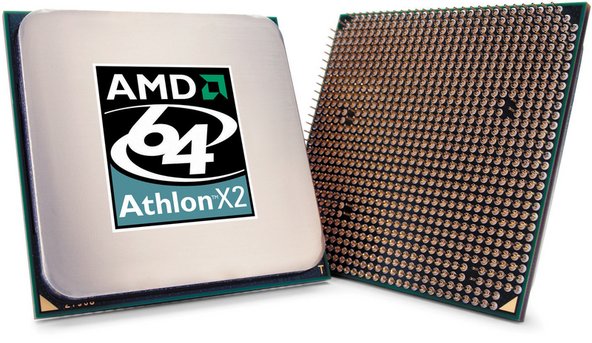 Figure 5-4: AMD Athlon 64 X2 processor (image courtesy of AMD, Inc.)
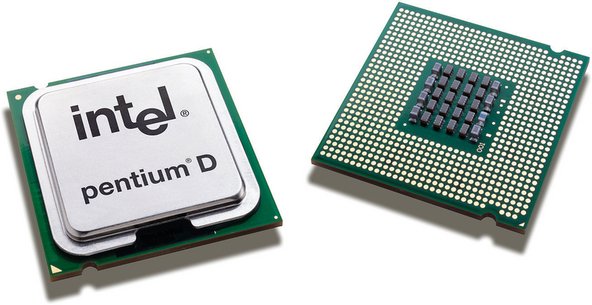 Figure 5-5: Intel Pentium D dual-core processor (image courtesy of Intel Corporation)
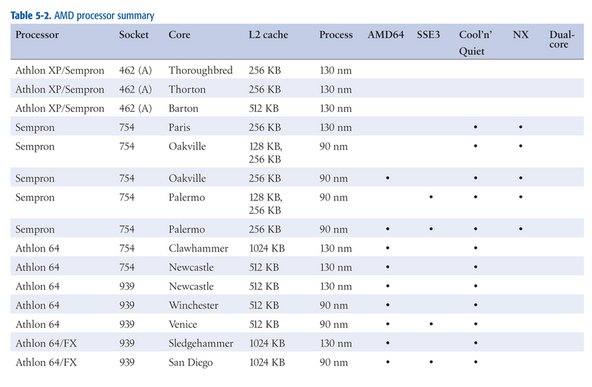 Table 5-2: Table 5-2. AMD processor summary
 Table 5-3: Intel processor summary


 A Super Scan with File Recovery revealed a FAT32 partition with files/folders - photos/videos.